 Blog Home
Automate Wishlist Engagement with Shopify Flow + Swym Wishlist Plus
What if every wishlist action your shoppers take could instantly trigger the right marketing campaign, restock alert, sales outreach, or analytics event, without your team lifting a finger?
.png)
Our most recent articles
What if every wishlist action your shoppers take could instantly trigger the right marketing campaign, restock alert, sales outreach, or analytics event — without your team lifting a finger?
With Swym Wishlist Plus now deeply integrated with Shopify Flow, that's exactly what's possible. Wishlist activity, Save for Later behavior, Back-in-Stock subscriptions, and Coming Soon alerts can all become powerful automation triggers across your entire store stack.
In this guide, we'll walk through practical, team-by-team automation playbooks — covering every major use case for marketing, merchandising, sales, analytics, and product teams.
What is Shopify Flow?
Shopify Flow is Shopify's native automation platform built around three simple building blocks:
- Trigger – A shopper or system event that starts the workflow
- Condition – Logic that determines whether an action should fire
- Action – The automated task that gets executed
No code required. Just connect triggers to actions, set your conditions, and your store runs itself.
Swym Wishlist Plus Triggers Available in Shopify Flow
Swym Wishlist Plus exposes a comprehensive set of triggers across wishlist activity.
Wishlist Events
Price, Stock & Availability Alerts
Marketing Automation Use Cases
1. Connect to Any Marketing Channel — Email, SMS, WhatsApp, LINE, Push, and More
Triggers: Price drop alert/ Low stock alert/ Back in stock alert for Wishlist
Action: Native action exposed by your marketing platform (e.g. Track Event in Klaviyo), or Send HTTP Request via Shopify Flow for platforms without native Shopify Flow actions
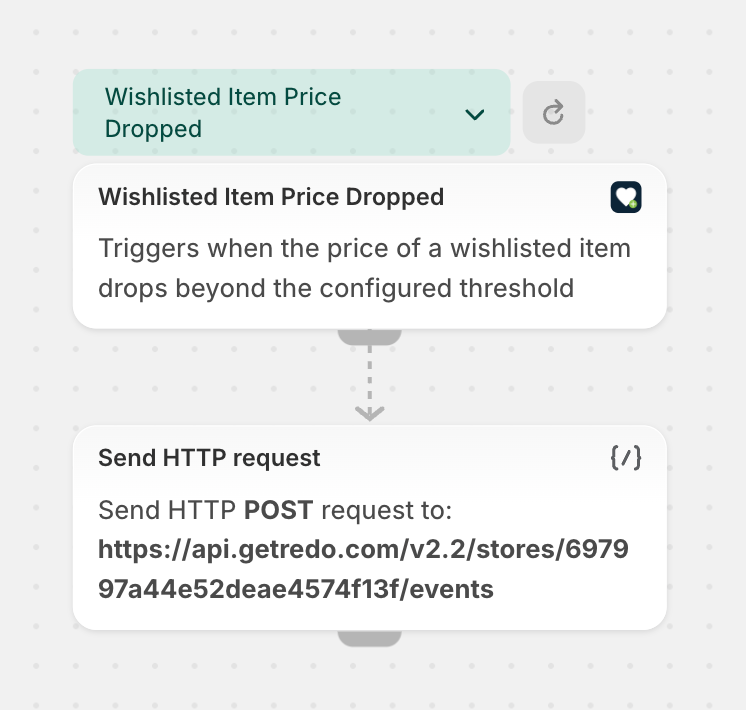
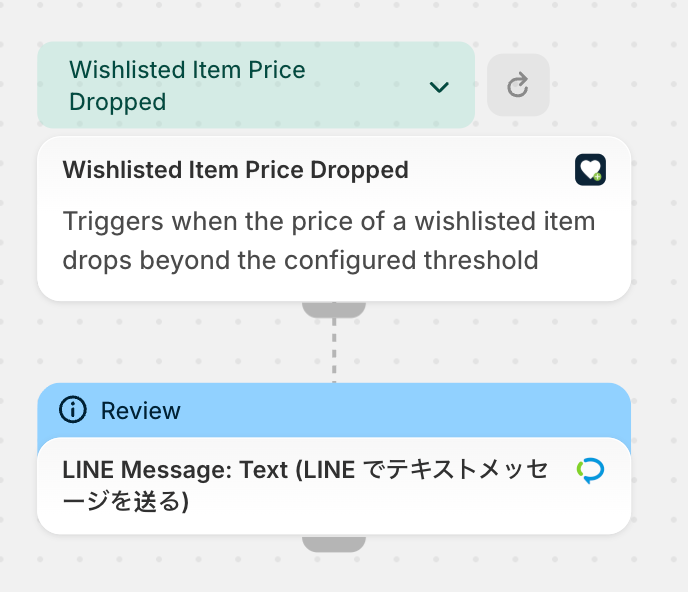
Swym's native integrations cover the basics, but with Shopify Flow, you can route wishlist signals into any marketing platform in your stack — including channels not natively supported by Swym.
Use this to send:
- Price drop alerts the moment a wishlisted or saved item goes on sale
- Low stock urgency messages to create FOMO before an item sells out
- Back-in-stock notifications so shoppers never miss a restocked favorite
Whether you're on Klaviyo, Attentive, LINE, WhatsApp, or any other platform — if it connects to Shopify Flow natively or accepts an HTTP request, it becomes a delivery channel for wishlist intelligence.
Example: A fashion retailer uses Shopify Flow to route wishlist price drop events to LINE — their primary customer communication channel in Japan. When a wishlisted item goes on sale, shoppers receive an instant LINE message in their native language, driving a 3x higher open rate than email.
2. Segment Shoppers and Add Customer Tags Based on Wishlist Behavior
Triggers: Item added to wishlist/ Price drop alert/ Low stock alert/ Back in stock alert for Wishlist
Action: Tag customer in Shopify
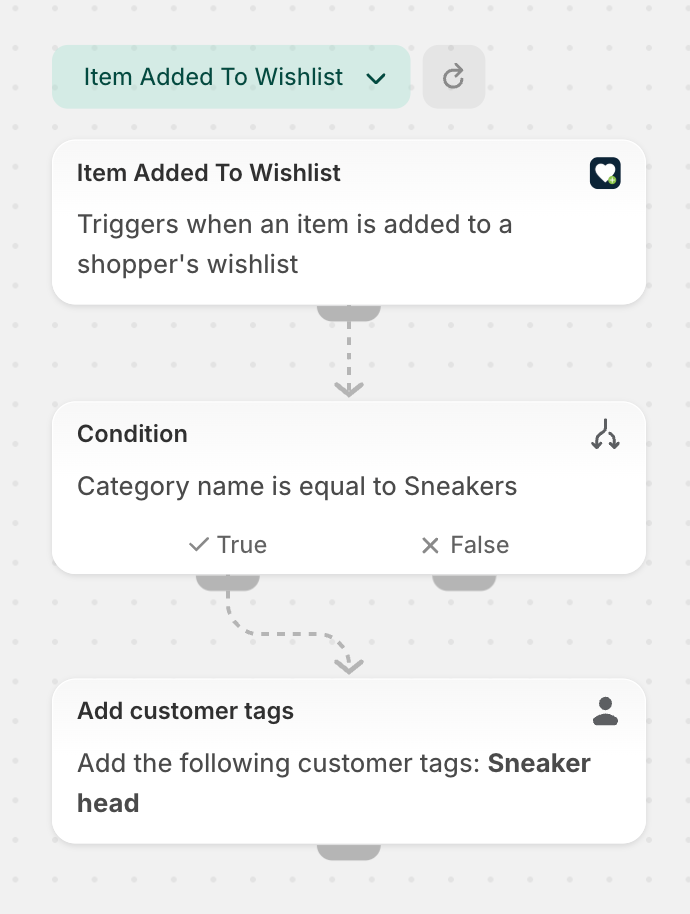
Wishlist behavior tells you a lot about who a shopper is and what they want. Use it to:
- Tag shoppers by wishlisted category (e.g., category:sneakers, category:luxury)
- Tag shoppers by product price tier — e.g. if the wishlisted item's price exceeds a threshold, tag as high-value-wishlist
These tags feed directly into your ad audiences, email segments, and personalization engines for more precise targeting.
Example: A multi-category retailer tags shoppers based on the category of every item they wishlist. A shopper who wishlists three sneakers gets tagged category:sneakers, which automatically adds them to a targeted Facebook ad audience for an upcoming sneaker drop — without any manual segmentation work.
3. Reward Shoppers Based on Wishlist Engagement
Triggers: Low stock alert for WL
Action: Native action exposed by your loyalty platform (e.g. Add Loyalty Points in Smile.io or LoyaltyLion), or Send HTTP Request via Shopify Flow
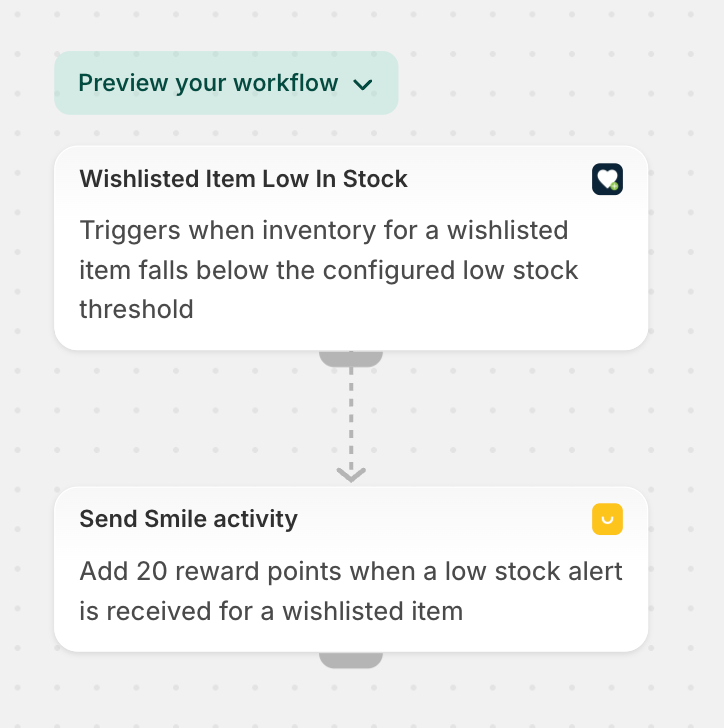
When a shopper’s saved items start running low, that's the perfect moment to accelerate the purchase. Use wishlist signals to trigger rewards at the right time.
Connecting wishlist intent signals to your loyalty program creates a virtuous cycle — rewarding engagement while driving urgency-led conversions.
Example: A beauty brand awards 50 bonus loyalty points whenever a shopper's wishlist runs low on stock. The shopper receives an additional 100 points if they complete the purchase within 48 hours — turning a passive wishlist into an active, time-sensitive conversion.
Merchandising Automation Use Cases
4. Alert Teams When Wishlist Social Count for a Product Crosses a Threshold
Trigger: Item added to wishlist
Condition: Wishlist Social Count exceeds a threshold
Action: Send Slack notification or internal email
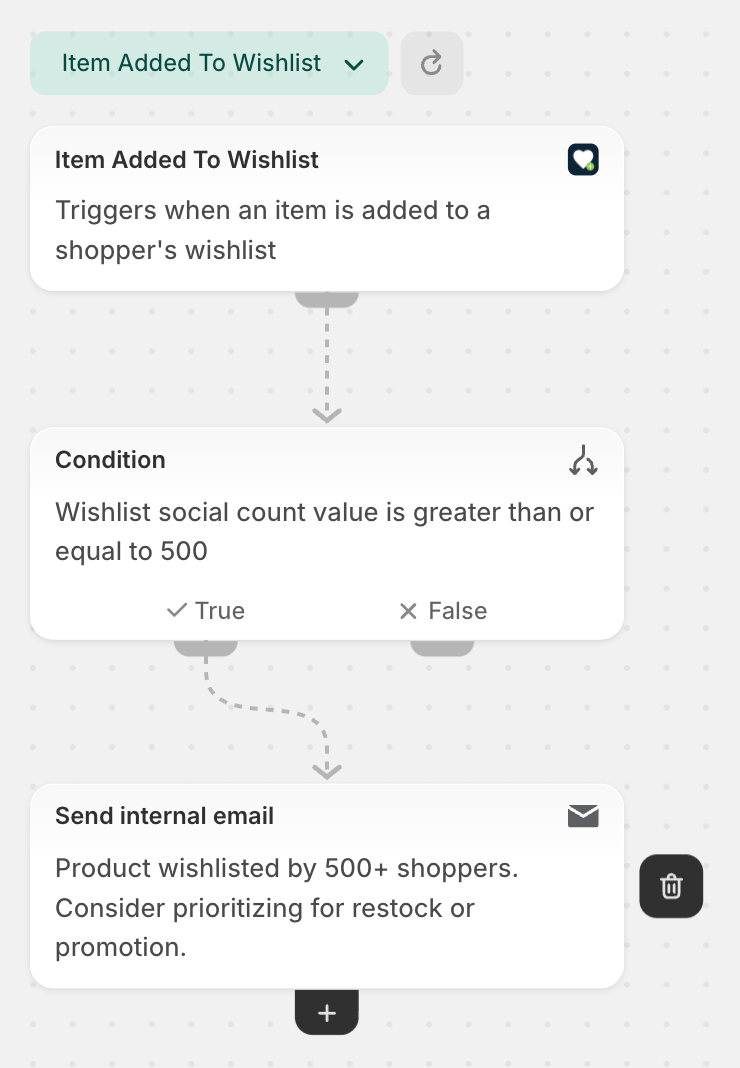
When a product accumulates enough wishlist saves to signal breakout demand, your merchandising team gets an automatic alert — so trending products can be promoted, prioritized, or fast-tracked for restock before the moment passes.
Example: "Product X has been wishlisted by 500+ shoppers. Consider prioritizing restock or promotion."
Analytics Use Cases
5. Sync Wishlist Events to CDPs, Data Warehouses, and Analytics Tools
Triggers: Item added to wishlist, Item removed from wishlist, Price drop/ Low stock/ Back in Stock alert for Wishlist item
Action: Native action exposed by your CDP or analytics platform (e.g. Track Event in Segment), or Send HTTP Request via Shopify Flow
Every wishlist interaction is a behavioral data point worth capturing. By syncing these events to your CDP, data warehouse, or analytics platform, your data team can:
- Track demand trends at the product, category, and collection level
- Identify conversion gaps — products frequently wishlisted but rarely purchased
- Analyze wishlist-to-purchase conversion rates by segment, channel, and product type
- Map the full pre-purchase journey from first wishlist save through to order
- Build predictive models using wishlist depth, velocity, and value as input signals
Example: A multi-brand retailer syncs all wishlist events to their Segment CDP. Their data team builds a dashboard that tracks wishlist-to-purchase conversion by category — revealing that shoppers who wishlist items in the "outdoor gear" category convert at 2x the rate of other categories when sent a low stock alert. This insight reshapes their entire alert prioritization strategy.
Get Started
To start building workflows with Swym Wishlist Plus and Shopify Flow:
- Install Swym Wishlist Plus from the Shopify App Store and upgrade to the Pro plan or above
- Open Shopify Flow
- Select a Swym Wishlist Plus trigger
- Add your conditions and actions
- Activate the workflow
Once live, your store will automatically respond to shopper intent — in real time, at scale, across every team.
We are rolling out Swym Wishlist Plus triggers and actions on Shopify Flow in phases, and we'll keep this guide updated as new capabilities go live. Have a specific use case or automation in mind that you'd like to enable today? We'd love to help you set it up. Reach out to us at support@getswym.com and our team will get you sorted.
Capture the Products your Shoppers Truly Love
Swym Wishlist Plus lets shoppers save products they love, ensuring valuable customer intent is never lost and ready to convert.


.webp)