 Blog Home
Back in Stock, done right: driving restock sends with Swym and Klaviyo flows
A shopper who asks to know when an item is back has told you what to send. Swym passes the product, size, and SKU to Klaviyo, so each restock alert matches the request.

Our most recent articles
In short
- Every Back in Stock signup reaches Klaviyo with the product, variant, SKU, price, and stock quantity attached.
- Build one flow for each of 3 Swym triggers: signup confirmation, restock alert, and restock reminder.
- Split one flow by Medium, and send SMS or email to each shopper on the channel they chose.
- You need Swym Starter or above, a Klaviyo account with Email and SMS, and the Swym and Klaviyo integration turned on.
- On Swym Pro and above, batch sending spreads a limited restock across shoppers, so alerts match the stock you have.
A shopper picks a size and finds it sold out. They ask to be told when it returns. That is one of the clearest requests a shopper can make.
They named the product. They named the size. They gave you a way to reach them. Your restock alert is the answer, and it lands best when it names the same product and size on the channel they chose.
Here’s how Swym Back in Stock Alerts passes that detail to Klaviyo, and how you can build flows that put it to work.
Learn how Back in Stock Alerts works →
What a restock request tells you
When a shopper signs up on a sold-out product, Swym sends the request to Klaviyo as an event. Shoppers can sign up as guests, and they can pick a variant, such as size or color.
Each event carries the details of the request:
- Product and variant: name, ID, variant details ("black", “medium”), and SKU
- Price and stock: the price and the quantity available
- Page and image: the product URL and the image URL.
- Channel: email or SMS, the way the shopper asked to be reached
- Brand, category, and tags for the product
Klaviyo reads these as merge tags – placeholders that fill in each shopper’s details – like {{ event.VariantSKU }} and {{ event.ProductPrice }}. More than a dozen are available for your messages and flow splits.
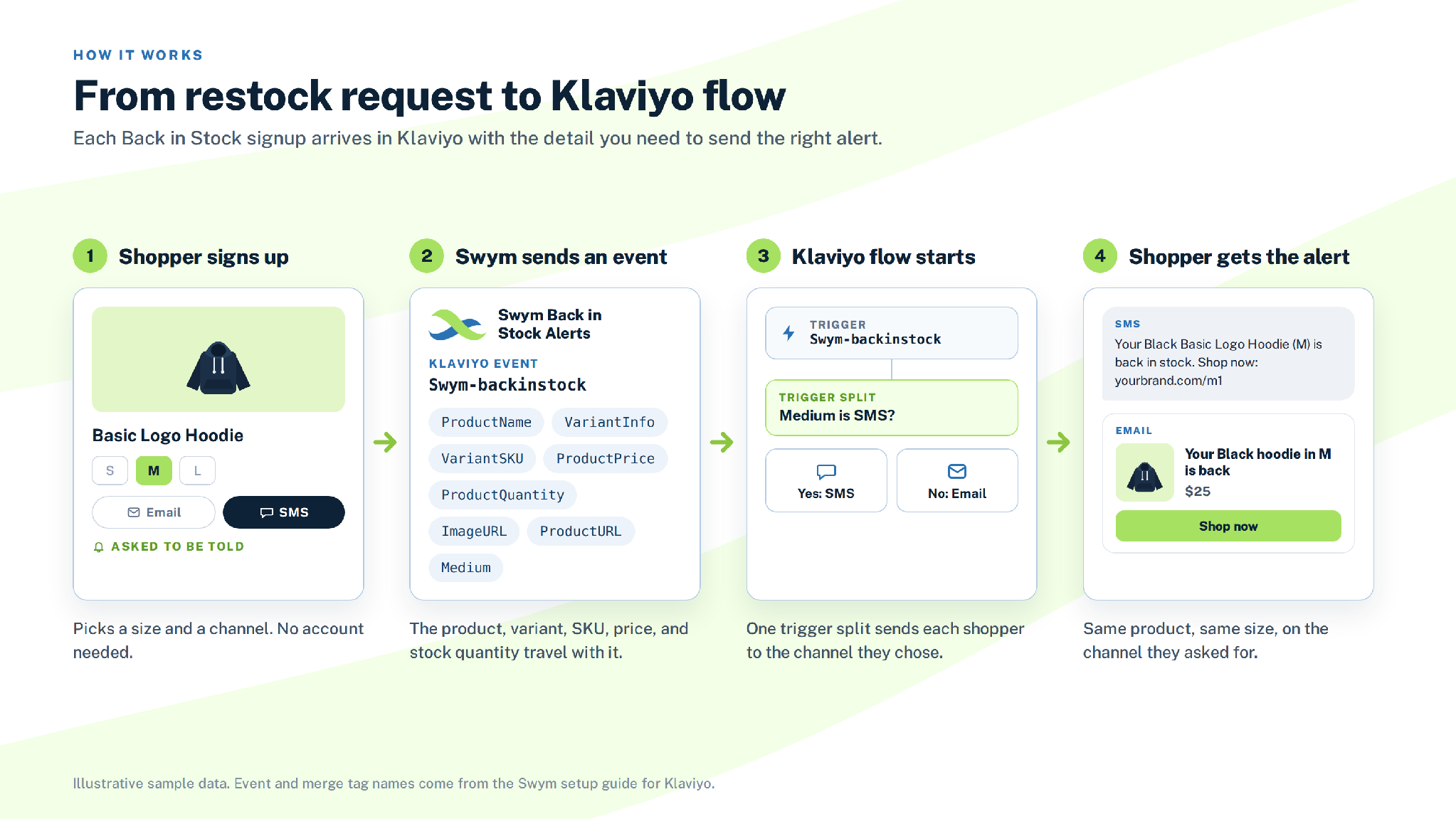
A Back in Stock signup becomes a Klaviyo event. The product, variant, SKU, price, and stock quantity travel with it.
Three triggers, three flows
Swym sends three triggers in Klaviyo. Each one needs its own flow.
- Swym-remindMe confirms the signup, so the shopper knows the request is registered.
- Swym-backinstock sends the restock alert when the item is available again.
- Swym-backinstockReminder sends a reminder after the first alert.
To find them, start a new flow, choose Metric as the trigger, and search for "Swym". If a trigger is missing, complete the Send trigger to Klaviyo step in the integration setup.
Set up your Klaviyo flows, step by step →
Send SMS and email from one flow
Shoppers choose email or SMS when they sign up. Klaviyo reads that choice as the event's Medium. Add a trigger split on Medium, send SMS on the Yes branch, and send email on the No branch.
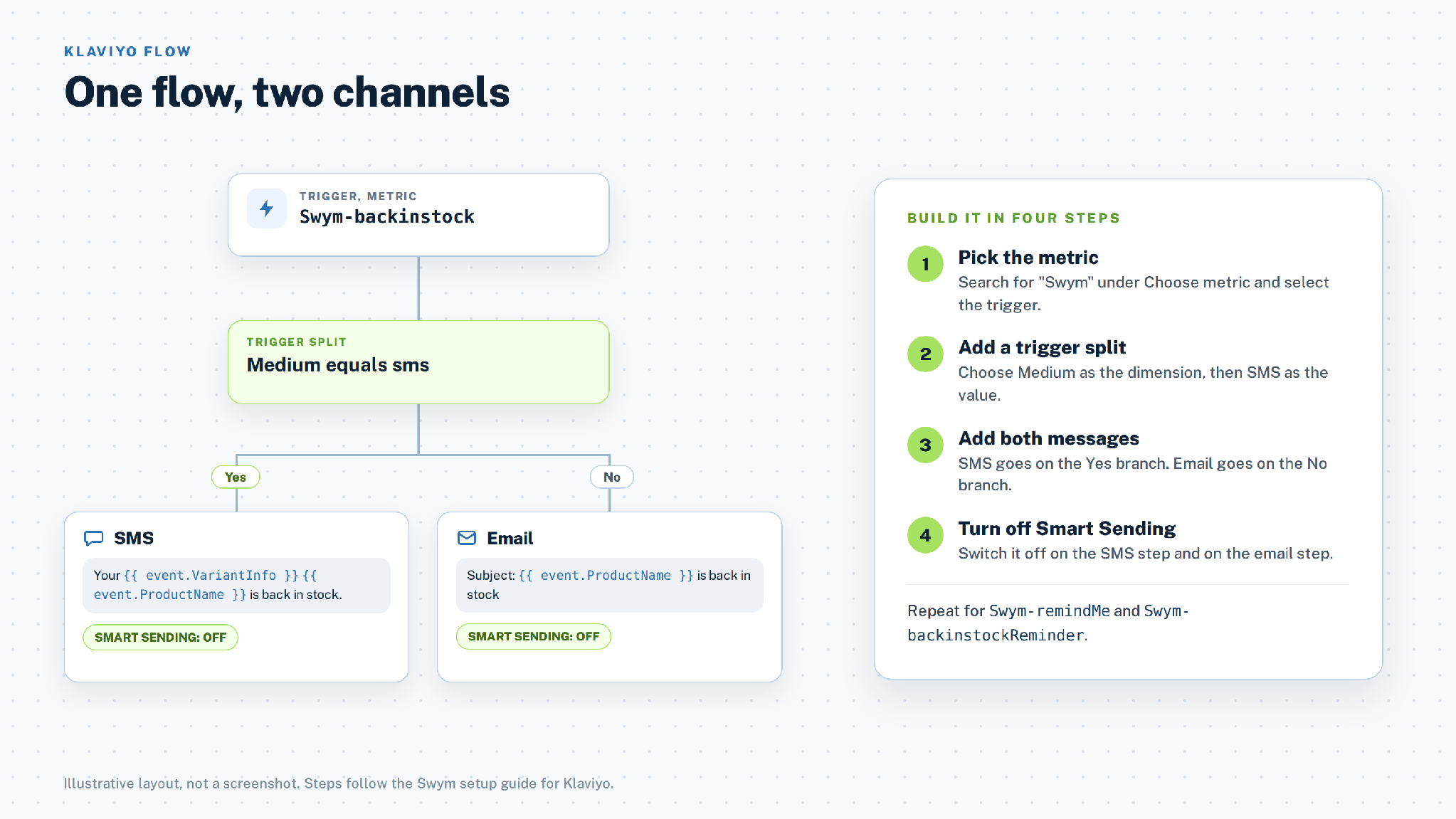
One trigger, one split, two messages. Repeat for each trigger you turn on.
Check that you have three things before you build:
- Swym Starter plan or above
- A Klaviyo account with an Email and SMS plan
- The Swym and Klaviyo integration turned on
Once the integration is on, Swym routes alerts through Klaviyo, so build flows for both email and SMS. Turn off Smart Sending on both message steps, as the Swym setup guide recommends, so each restock alert goes out.
Four ways to use SKU-level detail
Name the exact variant. Add {{ event.VariantInfo }} and {{ event.ProductName }} to the subject line and the first sentence. "Your Black Basic Logo Hoodie is back" tells the shopper this alert is for them.
Link to the exact variant. {{ event.ProductURL }} takes the shopper to the variant they asked about, and {{ event.ImageURL }} shows it in the message.
Remind once. Shoppers who haven’t bought after the first alert can get a reminder from the Swym-backinstockReminder trigger.
Offer an alternative. A shopper who wanted a sold-out item wants something close to it. Send suggestions for similar products, or run an offer for this audience in Klaviyo. Swym's SMS launch announcement describes both ideas.
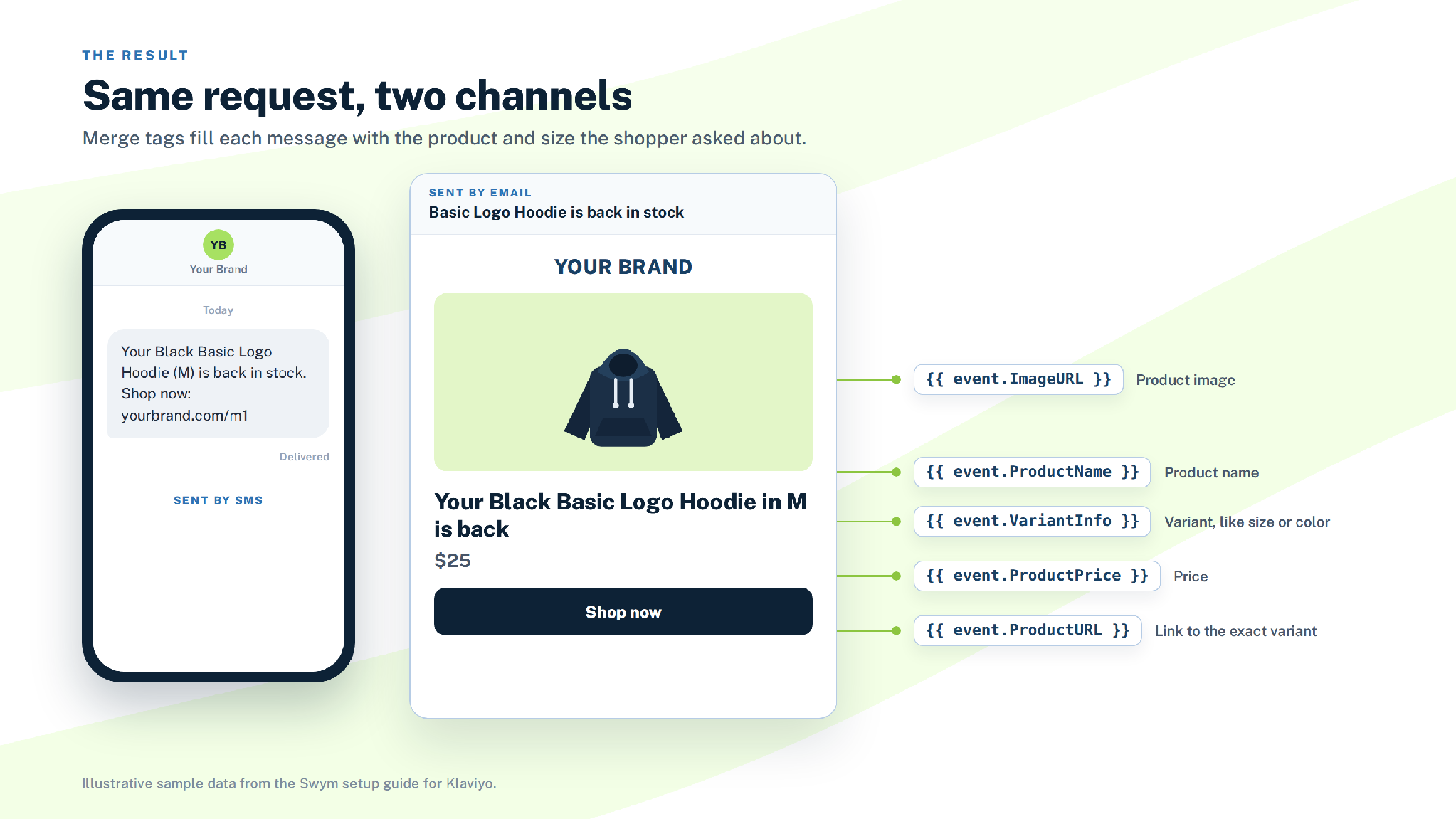
The same request becomes an SMS and an email. Merge tags fill in the product, price, image, and link.
Learn how Tibi uses Back in Stock Alerts →
Match alerts to the stock you have
A restock alert works best when the number of alerts fits the number of units. Batch sending splits your restock alerts into smaller groups and spreads them over time, so a limited restock reaches the right number of shoppers first.
Batch sending is available on the Swym Pro plan and above. Swym picks the shoppers for each batch first, then sends their alerts on every channel you use: email, SMS, and your Klaviyo flows. Turn it on in your Swym admin.
What's available today
- Back in Stock Alerts through Klaviyo: email and SMS alerts, sent from your Klaviyo account
- Three triggers: signup confirmation, restock alert, and restock reminder
- SKU-level detail: product, variant, SKU, price, stock quantity, image, and link on every event
- Batch sending: Swym Pro and above, for email, SMS, and your Klaviyo flows
- Plans: Swym Starter or above, plus a Klaviyo account with Email and SMS
How to get started
- Install Swym Back in Stock Alerts and turn on the Swym and Klaviyo integration.
- Choose the triggers you want to send.
- In Klaviyo, build one flow for each trigger. The setup guide shows each click.
- Add a trigger split on Medium, then write your SMS and email.
- Turn off Smart Sending and set the flow live.
Not on Klaviyo? Swym also connects with Omnisend, Attentive, Postscript, and other platforms. Explore all technology partners.
FAQ
Do shoppers need an account to sign up for alerts?
No. Shoppers can sign up as guests, and they can choose a variant such as size or color.
Which Swym plan do I need for the Klaviyo integration?
Back in Stock Alerts needs the Starter plan or above. For SMS, you also need a Klaviyo account with an Email and SMS plan.
Will Swym still send alerts after I turn on the Klaviyo integration?
Swym routes alerts through Klaviyo once the integration is on. Build flows for both email and SMS so every shopper gets a message.
Do I need a separate flow for each trigger?
Yes. Build one flow for each trigger you turn on. The steps are the same for all three.
Can I send restock alerts in batches?
Yes. Batch sending is on the Swym Pro and above plans. Swym picks the shoppers for each batch, then sends their alerts by email, SMS, and through your Klaviyo flows.
Why turn off Smart Sending?
Smart Sending limits how often a shopper receives messages. Turn it off for these flows, as the Swym setup guide recommends, because each alert answers a direct request.
Capture the Products your Shoppers Truly Love
Swym Wishlist Plus lets shoppers save products they love, ensuring valuable customer intent is never lost and ready to convert.
Customer Success Stories

Other recent articles

.webp)